
Visual Studio Code is an amazing editor with a large marketplace of extensions to tweak the editor to your use cases. It offers over 40,000 extensions, and more are added every single day.
Recently, I shared a list of extensions that get recommended a lot in articles here on Medium and elsewhere whose functionality is already supported natively and can be uninstalled.
Today I want to share the extensions I think are most important in a Web Developer's toolkit.
VS Code Extensions to Improve Your Workflow
The 7 extensions you'll find below are oriented around improving your workflow. They help you save time or prevent you from context switching.
1. Project Manager — 2.8M Downloads
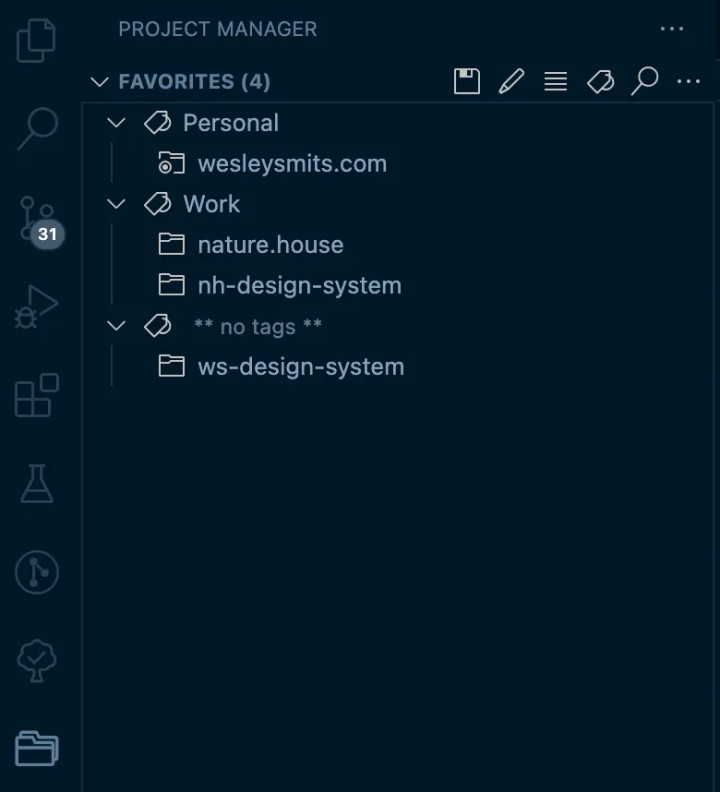
Project Manager is a simple plug-in that allows you to quickly switch between projects with one click. You can choose to open a project either in your current window or in a new window.
Before downloading this extension I was pretty fast at project switching through simple keyboard commands and selecting from the Recent Projects list within VS Code. Now that I have been using this extension for several months I can say this is much easier, especially when your list of projects is longer than the Recent Projects list in VS Code.
2. GitLens — 18M Downloads
Although Visual Studio Code has native Git integration, GitLens makes the experience so much better. It visualizes code authorship inline without ever cluttering the UI.
Here are some of the features which make me love GitLens:
- Easily navigate between revisions to see the entire history of a file at a glance.
- An unobtrusive current line blame. This lets you see who last edited the current code line, and when it was last changed. On hover, this will display much more detailed info.
- The status bar and top of the file displays a small note indicating who and when last edited this file as well.
- Many detailed sidebar views to look through commits, changes, file history, line history, branches, stashes, tags, remotes, and more.
3. Live Share — 10.2M Downloads
Live Share is an extension developed by Microsoft themselves, it lets you collaborate with another developer right from within VS Code. You can write code simultaneously, follow each other and debug together.
Unlike traditional pair programming, Visual Studio Live Share allows developers to work together, while retaining their personal editor preferences (e.g. theme, keybindings), as well as having their own cursor. This allows you to seamlessly transition between following one another, and being able to explore ideas/tasks on your own. In practice, this ability to work together and independently provides a collaboration experience that is potentially more natural for many common use cases. — Microsoft
Live Share became an important extension for me during the pandemic. At my current position - we almost exclusively work in pairs - working from home for two years straight allowed me to try out different tools. I prefer Live Share over other pair-program tools for various reasons:
- Live Share is 100% free.
- You can feel it is developed by Microsoft. It feels like a native part of VS Code instead of like a third-party integration.
- When joining someone else's Live Share session you maintain your entire setup, theme, editor preferences, and keybindings. This makes context-switching effortless.
- No performance issues. Many real-time pair programming tools slow down the editor. With Live Share, I've never had any issues in this regard.
Live Share is also great for following along with a candidate in a technical job interview or when hosting a developer stream since Live Share has an extension pack for in-editor chatting and/or audio calling.
4. Jira and Bitbucket (Atlassian Labs) — 1.2M Downloads
This extension by Atlassian adds great support for both Jira and Bitbucket right into your editor. It speeds up your workflow by reducing context switching and giving clear information right within the editor. Here are some of my favorite features of this extension:
- Easily create Jira tickets from within the editor.
- Find and choose an issue from the sidebar and create a branch to start working on it immediately. You can set up naming conventions to let the extension handle it for you. Additionally, it immediately assigns the ticket to you as well.
- Create a pull/merge request right from within VS Code.
If you use Bitbucket you can also perform code reviews easily from within VS Code and kick off builds.
PS: For GitHub and GitLab similar extensions exist which provide an amazing in-editor experience. Managing code reviews, opening branches based on issues, managing actions/pipelines, and other features becomes much faster if you have access to it from within the editor.
5. GitHub Copilot — 2.6M Downloads

GitHub Copilot is a little bit of a controversial topic at the moment, nevertheless, it's a great tool to use.
When people speak of it they often refer to Copilot writing entire functions for you based on a comment, the real power for me lies in simple autocompletes.
In most situations, it can autocomplete templates, functions, and loops exactly as you were planning to write them out. It is a huge time-saver.
6. Jest — 1.2M Downloads
If you write unit tests with Jest this extension is a blessing. The Jest extension can show you which lines of your code are covered by unit tests, a visual interface to passing/failing tests, easily run test suites or single tests, and more.
7. Turbo Console Log — 585K Downloads
If you're a console.log developer this is the extension for you. Turbo Console Log lets you highlight a variable and insert a meaningful console.log automatically with a keyboard shortcut. (CTRL+Option+L on Mac or CTRL+Alt+L on Windows).
It also has keyboard shortcuts to (un)comment or delete all console.log messages in the current file so you can easily clean up a file after debugging it.
VS Code Extensions to Improve Code Quality
1. ESLint — 23M Downloads
If you use ESLint for static code analysis the ESLint extension will increase your experience in VS Code. It gives real-time support helping you visualize and fix the issues as you code, instead of after you've run your build command.
2. Prettier — 25.7M Downloads
Prettier is an opinionated code formatter. It enforces consistent style by parsing and reprinting your code. It supports many languages and really improves the experience of maintaining consistent coding styles. Take a look at their website for more information on how to use Prettier.
Conclusion
Visual Studio Code is a great lightweight code-editor that can be customized through various extensions. The 9 extensions listed above are the 9 most useful extensions I have found.
Let me know in the comments which extensions I might have missed in this list.