
The native Web Share API lets you allow users to share text, links, and files to other apps installed on the device in the same way as platform-specific apps. Let’s take a look at how to use this new feature.
How to share links and text with the Web Share API?
This API exposes a share() method on the navigator object. This is a promise-based method that has a required properties object. You need to pass at least one of the following properties:
- title — The subject of the share, for example, is used as the subject of an e-mail.
- text — The message’s body text, for example, is used as the e-mail content.
- URL — The URL you want to share is appended after your body text.
- files — The file(s) you wish to share, for example, are used as attachments in an e-mail.
The code example below shows how easy it is to use the native share method and bind it to a simple button click:
<button id="share-button">Share me</button>

<script>
    const button = document.getElementById("share-button");

    button.addEventListener("click", () => {
        if ("share" in navigator) {
            navigator
                .share({
                    title: "Look ma: Native web sharing =D",
                    text: "This article on the native Web Share API is amazing!",
                    url: "https://medium.com/@WesleySmits/use-the-native-javascript-share-api-6ec67399a9d3",
                })
                .then(() => {
                    console.log("Callback after sharing");
                })
                .catch(console.error);
        } else {
            // Implement fallback sharing option
            alert("The Web Share API is not supported in this browser.");
        }
    });
</script>
How to share files with the Web Share API?
In order to share files with the Web Share API, it’s a good idea to add a check using the navigator.canShare() method to test whether the files can be shared.
Then you can add the files as an array in the files property.
<input type="file" name="files" multiple="true" />

<button id="share-button">Share me</button>

<script>
    const fileInput = document.querySelector('[name="files"]');
    let files;

    fileInput.addEventListener("change", (event) => {
        files = event.target.files;
    });

    const button = document.getElementById("share-button");

    button.addEventListener("click", () => {
        if (navigator.canShare && navigator.canShare({ files: files })) {
            navigator
                .share({
                    title: "Look ma: Native web sharing =D",
                    text: "This article on the native Web Share API is amazing!",
                    url: "https://medium.com/@WesleySmits/use-the-native-javascript-share-api-6ec67399a9d3",
                    files: files,
                })
                .then(() => {
                    console.log("Callback after sharing");
                })
                .catch(console.error);
        } else {
            // Implement fallback sharing option
            alert("The Web Share API is not supported in this browser.");
        }
    });
</script>
Browser Support for the Web Share API

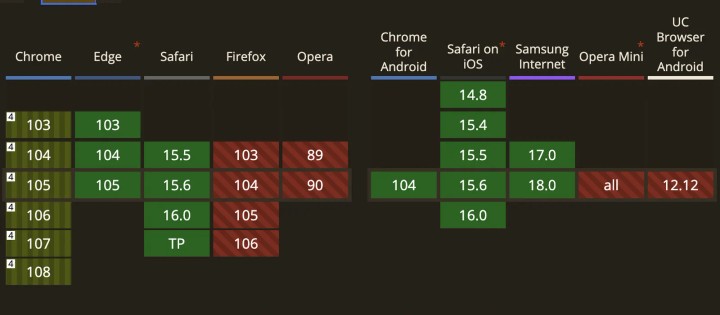
The browser support for the Web Share API is pretty good, there is no support in Firefox, however. It’s also interesting to see that although Chrome supports it on Windows and Chrome OS, it does not support it on macOS or Linux distributions as of now.
Resources
Conclusion
The Web Share API is a nifty feature that can be useful on some sites to provide a user-friendly way to share. It’s simpler to implement than a bunch of custom-sharing links. Additionally, it automatically shows the user options based on their installed apps.
Thanks for reading. If you have thoughts on this, be sure to leave a comment!
And if you want, you can connect with me on LinkedIn or Twitter